
“I wanna make music”🎶
At it’s core, Supercollider is for creating and orchestrating synthesizers. It’s most basic syntax for a Synth will let you hear audio from the default \instrument playing a tone at the default 440Hz, the frequency for the note A4 – the A just above middle C on a piano. 🎹
// play at 440 Hz
x = Synth(\default, [\freq, 440]);
// alternatively:
x = Synth(\default, [\midinote, 69]); // A4 is midi note 69
// free the synth:
x.free;
Now imagine we created a band of instruments using SynthDefs like \bass, \keys, etc. And what if we wanted them to play in the same key … you know … like a song.🎵
One brute force method would be to hard-code all the frequencies you want to use. But as you can imagine, that would get unwieldy very quickly. You would need to find the other frequencies which represent the full scale, and you would need even more calculation when we start shifting octaves or change keys.🧮
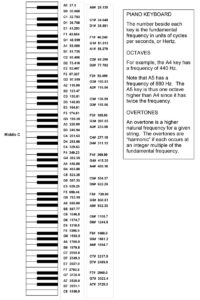
For context and reference, here is a PDF listing the frequencies of each key on an 88 key keyboard: https://www.vibrationdata.com/tutorials/piano.pdf📄
The Scale class 🔑
In Supercollider, as with many problems you may encounter like this one, of binding frequencies to a scale, I have found that the SuperCollider community (around since 1996) has probably already thought of a solution. This brings us to the Scale class. It is an object class that has several properties which define a musical scale and can be used to keep your composition in key. 🧰
Let’s inspect some scales: 🔍
(
var scale = Scale.major; // standard major scale
scale.name.postln; // the name
scale.degrees.postln; // the note spacing between keys in the scale
scale.size.postln; // the number of degrees in the scale
scale.tuning.postln;
)
/**
// yields:
Major
[0, 2, 4, 5, 7, 9, 11]
7
Tuning([0.0, 1.0, 2.0, 3.0, 4.0, 5.0, 6.0, 7.0, 8.0, 9.0, 10.0, 11.0], 2.0, "ET12")
// more examples:
Dorian
[0, 2, 3, 5, 7, 9, 10]
7
Tuning([0.0, 1.0, 2.0, 3.0, 4.0, 5.0, 6.0, 7.0, 8.0, 9.0, 10.0, 11.0], 2.0, "ET12")
Hindu
[0, 2, 4, 5, 7, 8, 10]
7
Tuning([0.0, 1.0, 2.0, 3.0, 4.0, 5.0, 6.0, 7.0, 8.0, 9.0, 10.0, 11.0], 2.0, "ET12")
Major Pentatonic
[0, 2, 4, 7, 9]
5
Tuning([0.0, 1.0, 2.0, 3.0, 4.0, 5.0, 6.0, 7.0, 8.0, 9.0, 10.0, 11.0], 2.0, "ET12")
Chromatic 12 (ET12)
[0, 1, 2, 3, 4, 5, 6, 7, 8, 9, 10, 11]
12
Tuning([0, 1, 2, 3, 4, 5, 6, 7, 8, 9, 10, 11], 2, "ET12")
*/
I am personally familiar with chromatic, major, minor, pentatonic and diminished scales just from messing around with guitar and piano. But there are so many more and they have been taken straight from music theory and baked into SuperCollider 📚. To see the entire list of Scales that SuperCollider knows about, use Scale.directory:🎛️
Scale.directory;
// yields:
/**
\ aeolian: Aeolian
\ ahirbhairav: Ahirbhairav
\ ajam: Ajam
\ atharKurd: Athar Kurd
\ augmented: Augmented
\ augmented2: Augmented 2
\ bartok: Bartok
\ bastanikar: Bastanikar
\ bayati: Bayati
\ bhairav: Bhairav
\ chinese: Chinese
\ chromatic: Chromatic
\ chromatic24: Chromatic 24
\ diminished: Diminished
\ diminished2: Diminished 2
\ dorian: Dorian
\ egyptian: Egyptian
\ enigmatic: Enigmatic
\ farahfaza: Farahfaza
\ gong: Gong
\ harmonicMajor: Harmonic Major
\ harmonicMinor: Harmonic Minor
\ hexAeolian: Hex Aeolian
\ hexDorian: Hex Dorian
\ hexMajor6: Hex Major 6
\ hexMajor7: Hex Major 7
\ hexPhrygian: Hex Phrygian
\ hexSus: Hex Sus
\ hijaz: Hijaz
\ hijazDesc: Hijaz Descending
\ hijazKar: hijazKar
\ hindu: Hindu
\ hirajoshi: Hirajoshi
\ hungarianMinor: Hungarian Minor
\ husseini: Husseini
\ huzam: Huzam
\ indian: Indian
\ ionian: Ionian
\ iraq: Iraq
\ iwato: Iwato
\ jiao: Jiao
\ jiharkah: Jiharkah
... and more ...
*/
Scale Browser Tool 🧭🎶
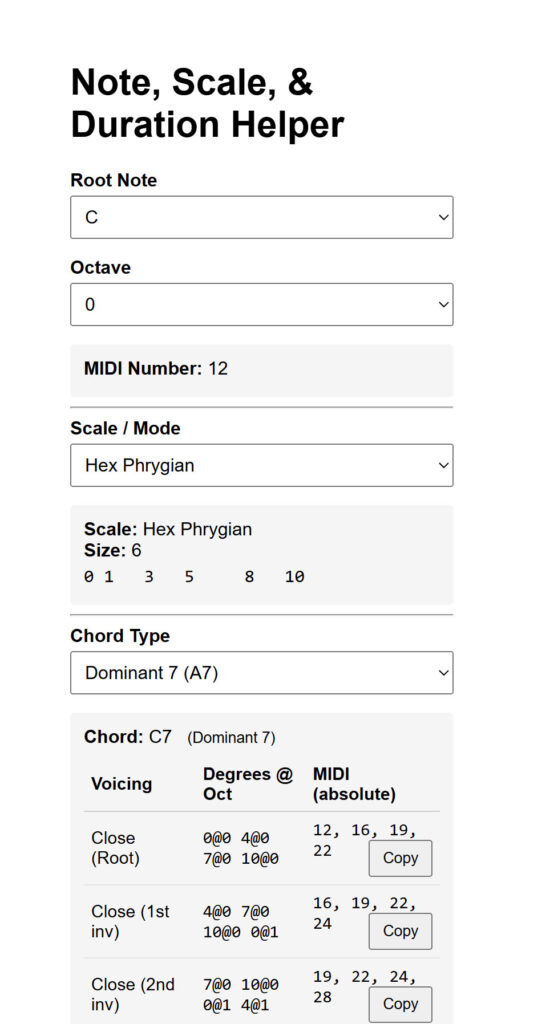
Aside from the standard scales, I can’t really think of other ones off the dome. By exporting SuperCollider’s directory of scales and their properties, I was able to put together a scale browser with all of SuperCollider’s known scales in a dropdown. It also shows you how the notes/degrees in that scale are spaced out on a grid.
This tool was built for exploration, you can 1) see what’s even available and 2) select scales you’ve never heard of and audition them.
Download this index.html file and open it in your browser to have a look:
Listen to some scales! 👂🎵
To walk up and down a musical scale, I present this function that returns a Pbind (a pattern) that given a Scale, does just that (it uses a helper function called ~noteToFreq which we will cover below):
~walkScale: ▶️
(
// returns a Pbind that walks a given scale up & down from degree 0..size..0
~walkScale = {
    arg scale, // e.g. Scale.major
        root=69, octave=0, dur=1, amp=0.2, cycles=inf;
    var degrees, pattern;
    // degrees: 0,1,2,...,size, size-1,...,1  (includes the octave tonic once)
    degrees = (0 .. scale.size).mirror1;
    pattern = Pbind(
        \instrument, \default, // default built-in instrument
        \scale,   scale,
        \root,    root,         // MIDI (69 == A4)
        \degree,  Pseq(degrees, cycles), // sequence the degrees
        \octave,  octave,
        // uses ~noteToFreq function (scale+root+degree+octave -> Hz)
        \freq,    Pfunc(~noteToFreq),
        \dur,     dur,
        \amp,     amp
    );
    pattern; // return the pattern to play
};
)
Now just plug in any scale to hear it. Some examples of scales in A, octave 0, using 1/8th notes:🎯
Major
~walkScale.(Scale.major, 69, 0, 1/8).play;Harmonic Minor
~walkScale.(Scale.harmonicMinor, 69, 0, 1/8).play;Chromatic
~walkScale.(Scale.chromatic, 69, 0, 1/8).play;Locrian
~walkScale.(Scale.locrian, 69, 0, 1/8).play;Mixolydian
~walkScale.(Scale.mixolydian, 69, 0, 1/8).play;Hindu
~walkScale.(Scale.hindu, 69, 0, 1/8).play;Converting Notes in a Scale -> Frequency ⚙️➡️Hz
A musical note consists of a scale, an octave, a degree along the scale, and the root note of the scale as discussed above. These properties define the MIDI note, but that doesn’t actually play anything. In SuperCollider, Synths operate in frequencies, in hertz, and Synths are what execute the notes. So to hear anything, the synth needs a \freq (frequency) parameter that says what frequency to emit. 📏
To hear the notes in a scale through a Synth, I offer this helper function that converts a note in a scale to a frequency so you can play it: 🛠️
/**
* Uses the Event's `scale`, `root`, `degree`, and `octave` to resolve to a frequency.
*
* @example
* ~noteToFreq.(( \scale: Scale.minorPentatonic, \root: 69, \degree: 0, \octave: 0 )); // 440.0
*/
(
// A helper Function that takes an Event with note information and returns a frequency representation in Hz
~noteToFreq = { |ev|
    var scale   = ev[\scale]  ? Scale.minorPentatonic;
    var rootHz  = (ev[\root]  ? 0).midicps;
    var degree  = ev[\degree] ? 0;
    var octave  = ev[\octave] ? 0;
    // noteToFreq takes (degree, rootFreq, octave)
    scale.degreeToFreq(degree, rootHz, octave);
};
"~noteToFreq.() to resolve degree / octave / scale to frequency ready".postln;
)
This is how you would call the function just raw, but we will have Synths call it to use these Hz (using A4 as the root) further below. ⬇️
(
~noteToFreq.(( \scale: Scale.minorPentatonic, \root: 69, \degree: 0, \octave: 0 )); // degree 0, octave 0
// 440.0Hz
)
(
~noteToFreq.(( \scale: Scale.minorPentatonic, \root: 69, \degree: 0, \octave: 1 )); // degree 0, octave 1 up = 440 x 2
// 880.0Hz
)
(
~noteToFreq.(( \scale: Scale.minorPentatonic, \root: 69, \degree: 1, \octave: 1 )); // degree 1, ocatave 1 (starts at 0)
// 1046.5022612024Hz
)
(
~noteToFreq.(( \scale: Scale.minorPentatonic, \root: 69, \degree: 2, \octave: 1 )); // degree 2, octave 1 (starts at 0)
// 1174.6590716696Hz
)
Use ~noteToFreq in a synth 🎚️
To use ~noteToFreq you need to use Synths that use \freq as one if it’s main driving arguments. Here are a couple I stole with credits that we will use for some examples of usage. Don’t worry too much about the guts of these Synths, I’ve just posted them here to be easily copied and pasted. 🧪
\cheapPiano:
(
SynthDef(\cheapPiano, {
    arg out=0, freq=440, // our frequency parameter
        amp=0.1, dur=1, pan=0;
    var sig, in, n = 6, max = 0.04, min = 0.01, delay, pitch, detune, hammer;
    freq = freq.cpsmidi;
    hammer = Decay2.ar(Impulse.ar(0.001), 0.008, 0.04, LFNoise2.ar([2000,4000].asSpec.map(amp), 0.25));
    sig = Mix.ar(Array.fill(3, { arg i;
        detune = #[-0.04, 0, 0.03].at(i);
        delay = (1/(freq + detune).midicps);
        CombL.ar(hammer, delay, delay, 50 * amp)
    }) );
    sig = HPF.ar(sig,50) * EnvGen.ar(Env.perc(0.0001,dur, amp * 4, -1), doneAction:2);
    Out.ar(out, Pan2.ar(sig, pan));
},
metadata: (
    credit: "based on something posted 2008-06-17 by jeff, based on an old example by james mcc",
    tags: [\casio, \piano, \pitched]
    )
).add;
)\tone:
(
SynthDef(\tone, {
    arg out=0,         // audio bus
        freq=440,      // oscillator frequency in Hz
        atk=0.01,      // percussive attack time
        rel=0.95,       // percussive release time
        amp=0.5,       // overall amplitude
        pan=0;         // stereo pan (-1 to 1)
    var env, sig;
    // Percussive envelope: attack, release, auto–doneAction
    env = EnvGen.kr(
        Env.perc(atk, rel, 1, -4),  // level scale left at 1
        doneAction: 2
    );
    // Triangle oscillator
    sig = LFTri.ar(freq);
    // Apply envelope and amplitude, then pan
    sig = sig * env * amp;
    sig = Pan2.ar(sig, pan);
    // Output to bus
    Out.ar(out, sig);
}).add;
"\\tone (perc) synth ready".postln;
)\subBass:
(
// \dur & \legato drive gate time; no \sustain needed
SynthDef(\subBass, {
    var out = \out.kr(0),
        freq = \freq.kr(60), // frequency parameter
        atk  = \atk.kr(0.005),
        rel  = \rel.kr(0.12),
        amp  = \amp.kr(0.3),
        cutoff = \cutoff.kr(200),
        rq   = \rq.kr(0.2),
        pan  = \pan.kr(0),
        gate = \gate.kr(1);
    var env = EnvGen.kr(Env.asr(atk, 1, rel), gate, doneAction: 2);
    var sig = SinOsc.ar(freq);
    sig = RLPF.ar(sig, cutoff, rq);   // resonance-capable lowpass
    Out.ar(out, Pan2.ar(sig * env * amp, pan));
}).add;
)
Play an instrument in a key 🎹
We will use Pbind to play a musical pattern in a scale/key using the instruments defined above using SynthDef.
Here is a simple pattern that demonstrates note values that change over time, and how the frequencies play based on them: 🎯
// Walk through the scale then fill the rest of the 16 beats.
(
p = Pbind(
    \instrument, \cheapPiano, // our defined piano synth
    // these 4 parameters define the note:
    \scale,   Scale.mixolydian,
    \root,    40, // E2
    \degree,  Pseq([0,1,2,3,4,5,6,Pn(7, 4), Pn(6, 5)], inf), // walk through the scale degrees then hang at 7 then back to 6
    \octave,  Pseq([Pn(1, 7), Pn(0, 3), Pn(2, 6)], inf), // switches octaves over the course of 16 beats
    // now plug in \freq using our ~noteToFreq function:
    \freq,    Pfunc(~noteToFreq),  // now returns *Hz* directly based on degree/octave/scale/root
    \dur,     Pseq([Pn(1/4, 10), Rest(1/4), Pn(1/4, 2), Rest(1/4), Pn(1/4, 2)], inf), // duration pattern over 16 beats (inludes Rests)
    \atk, 0.01,
    \rel, 0.06,
    \amp,     Pseg(
        Pseq([0.05,   0.65,   0.2, 0.05], inf),   // 3 levels
        Pseq([2,   4,   1.5, 0.5], inf)         // 3 segment-lengths, sum = 16
    ),
    \pan,     Pwhite(-1.0, 1.0),
    \out, 0
);
x = p.play;
)
Play instruments together in a key 🤖🎶
Now we come to the ultimate point of this post. To start a robot band. 🦾
This is 2 different instruments playing in 2 different scales. But not really, as pentatonic is a subset of major, so they fit together with their roots being in A. 🔗
(
Ppar([
    Pbind(
        \instrument, \tone,
        \scale,     Scale.major,
        \root,      45, // A2 = midi 45 → 110 Hz
        \degree, Pseq([0, 2, 4, Pn(5, 3), Pn(2, 2)], inf),
        \octave, 1,
        \freq,      Pfunc(~noteToFreq),
        \dur, 1/4,
        \amp, 0.55,
        \strum, 0.2,
        \out, 0
    ),
    Pbind(
        \instrument, \subBass,
        \scale,     Scale.majorPentatonic,
        \root,      21, // A0 = midi 21 → 27.5 Hz
        \degree, Pseq([2, 0, 3, 4], inf),
        \octave, 1,
        \freq,      Pfunc(~noteToFreq),
        \dur, 1/2,
        \amp, 0.85,
        \out, 0
    )
]).play;
)
Ok, it’s no Opus but you can see where we are going with this, I hope. 😉
And I get it, where’s the drums?
We will soon get to drums 🤣🥁
Next time: Supercollider Score -> DAW (Ableton) 📤🎹
Patterns like the small example just above can be exported as a score. You can define many patterns and sequence and overlap them then export them to MIDI to import into your favorite digital audio workstation (DAW) to use your notes played by the premium instruments in those programs. 💽
We will cover that next time.
Until then, get colliding! 💥